
DORC's Remote Log-in Support Page

| Home Page |
| Products |
| Global Sales |
| Support |
| News |
| About DORC |
| Standards |
| Trade Shows |
| Contact Us |
| Welcome to DORC's Remote Log-in Support Page. |
|
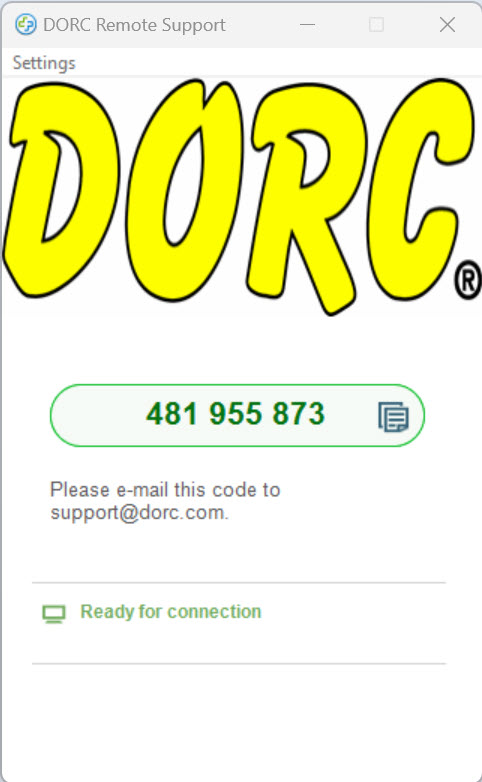
Please read the following carefully, and then click the button below to initiate a remote customer support session. This will allow us to access your PC and fix many problems remotely. We typically operate on United States Eastern Standard Time (EST) and depending on your location and time zone, the technician may link immediately - or several hours later. Since we are working with live video, please use the fastest possible internet connection!! NOTE: Much of the remote support we offer is performed on a complementary basis, however, on systems that are not under warranty (or where the problem is self induced) - it is possible that a remote support session will result in charges. By initiating the session, you are agreeing to pay any applicable charges. Download the DORC Remote Support Application HERE. Locate and double click on the downloaded file to install the DORC Remote Support Application. The DORC Remote Support screen below will then be visible - after reading and accepting the instructions presented initially:
After connecting, please leave the PC turned ON, with a PC connector inserted in the chuck - and (if possible) fringes visible. Since we may well be on different time zones, there may be a several hours lag between you connecting, and support starting. Please be patient!! Additionally, if your PC is set to logout after a period of inactivity, you MUST disable this feature to allow us to connect! |
Copyright© 1992-2024, Direct Optical Research Company
DORC® is a Registered Trademark of Direct Optical Research Company
Last modified: March 4th, 2024
Tel: (727) 319-9000 sales@dorc.com
DORC®, 8725 115th Avenue North, Largo, FL 33773 USA
We respond to ALL e-mails within 24 hours - if you don't get our response, bypass our SPAM PREVENTION by clicking here!!